Writeup LKSN ITNSA NTB 2021 - Packet Tracer Troubleshoot
Table Of Contents
Introduction
Hello, everyone. Today’s post is based on the second of three questions titled “Packet Tracer Troubleshooting” that will be part of the NTB LKSN competition from ITNSA in 2021.
Unlike the previous question, this time, we are asked to troubleshoot the configuration of network devices with a predetermined network topology using Cisco Packet Tracer.
The required skills to solve this problem include:
- Dynamic Host Configuration Protocol (DHCP).
- Radius.
- Network Time Protocol (NTP).
- Routing Protocol dan Route Redistribution.
- IP Security (IPSec).
- Cisco Adaptive Security Appliance (ASA) Firewall.
Let’s try it out. as usual, this question is answered with Cisco Packet Tracer.
Those who want to try it can get it from this ITNSA.
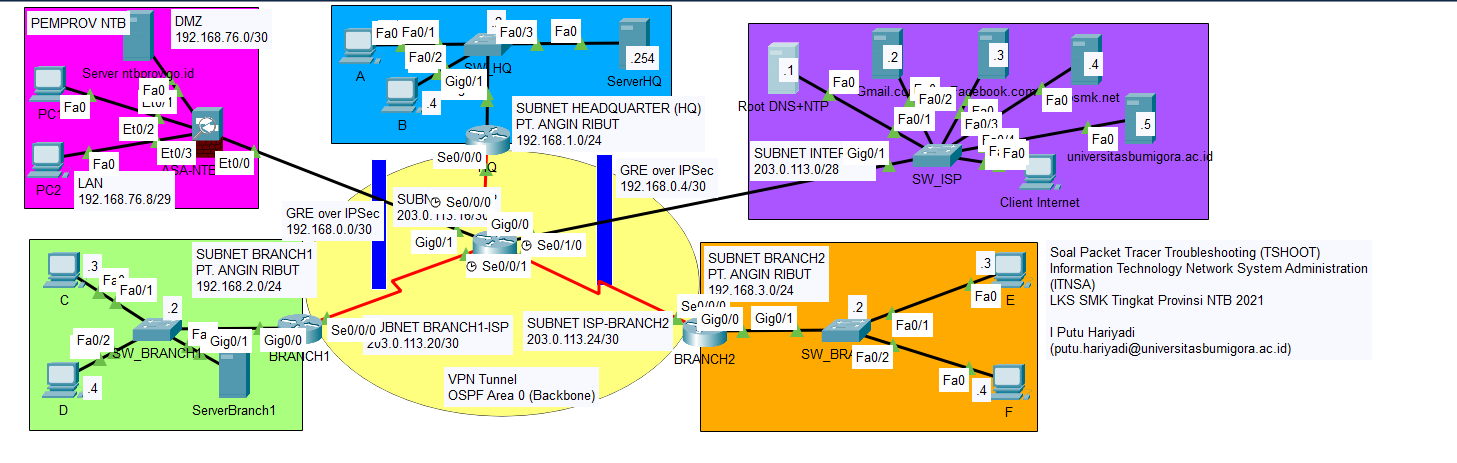
Troubleshooting 1 (Point: 25)
Questions:
Both hosts on LAN BRANCH1 and LAN BRANCH2 were unable to communicate with one another.
However, each BRANCH’s Internet connection to the Internet was successful.
Answers:
There is a typo in the ospf section of the network section 192.168.0.2/30 in BRANCH1.
There is a missing ospf section in the network section 192.168.3.0/24 in BRANCH2.
BRANCH1
Configuration :
BRANCH1#conf t
Enter configuration commands, one per line.  End with CNTL/Z.
BRANCH1(config)#router ospf 1
BRANCH1(config-router)#network 192.168.0.2 0.0.0.3 area 0
BRANCH1(config-router)#no network 192.168.0.2 0.0.0.0 area 0
23:09:50: %OSPF-5-ADJCHG: Process 1, Nbr 203.0.113.18 on Tunnel0 from FULL to DOWN, Neighbor Down: Interface down or detached

23:09:50: %OSPF-5-ADJCHG: Process 1, Nbr 203.0.113.18 on Tunnel0 from LOADING to FULL, Loading Done
Before :
BRANCH1#sh run | section ospf
router ospf 1
 log-adjacency-changes
 network 192.168.0.2 0.0.0.0 area 0
 network 192.168.2.0 0.0.0.255 area 0
After :
BRANCH1(config-router)#do sh run | section ospf
router ospf 1
 log-adjacency-changes
 network 192.168.2.0 0.0.0.255 area 0
 network 192.168.0.0 0.0.0.3 area 0
BRANCH2
Configuration :
BRANCH2#conf t
Enter configuration commands, one per line.  End with CNTL/Z.
BRANCH2(config)#router ospf 1
BRANCH2(config-router)#network 192.168.3.0 0.0.0.255 area 0
23:09:36: %OSPF-5-ADJCHG: Process 1, Nbr 203.0.113.18 on Tunnel0 from LOADING to FULL, Loading Done
Before :
BRANCH2#sh run | section ospf
router ospf 1
 log-adjacency-changes
 network 192.168.0.4 0.0.0.3 area 0
After :
router ospf 1
 log-adjacency-changes
 network 192.168.0.4 0.0.0.3 area 0
 network 192.168.3.0 0.0.0.255 area 0
Simple PDU

PING
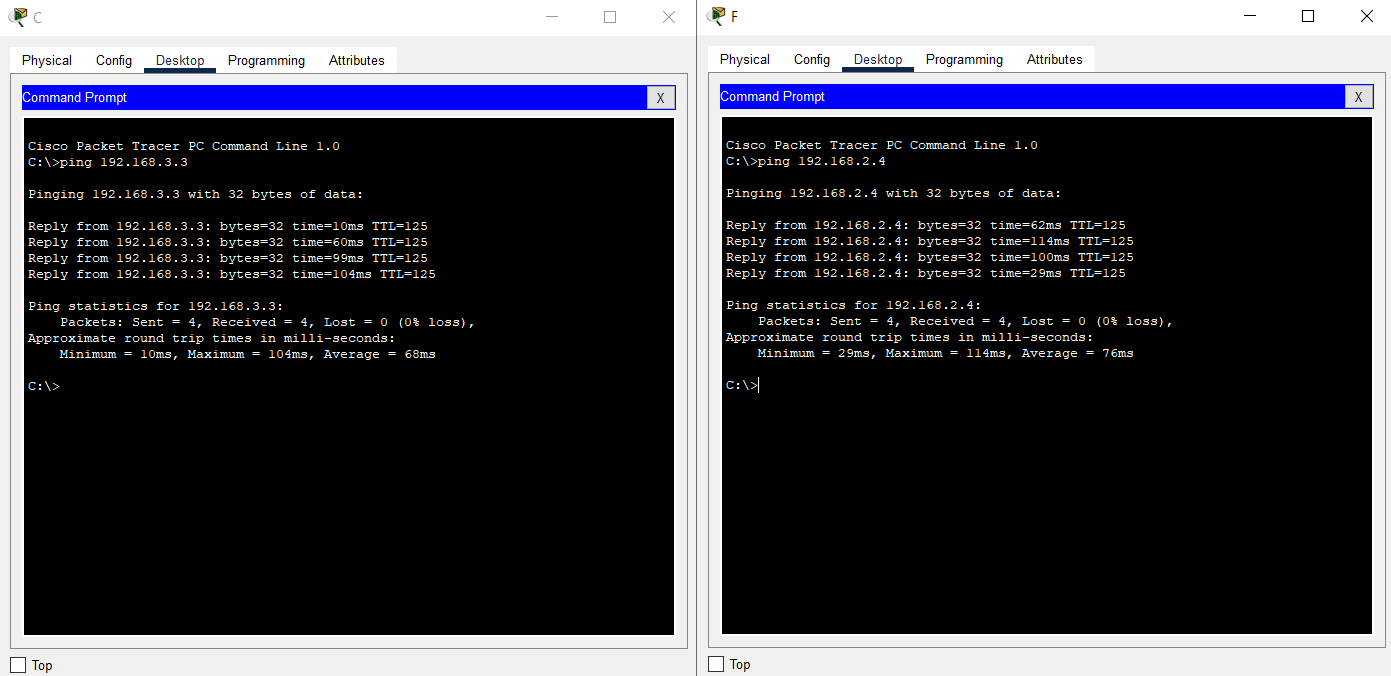
OSPF



Troubleshooting 2 (Point: 25)
Questions: The HQ, BRANCH1 and BRANCH2 routers were unable to synchronize their clocks with the Internet’s Network Time Protocol (NTP) server.
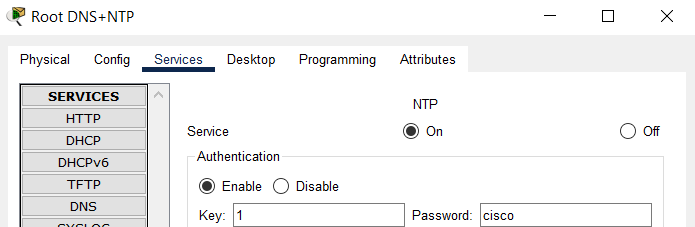
Answers: So I checked the configuration in ROOT DNS + NTP Server in the “Services > NTP” section and found that the password is “cisco” while HQ, BRANCH1 and BRANCH2 use “c1sc0,” indicating that there is an error in the password section.
NTP Server Password
ROUTER HQ
Configuration :
HQ#conf t
Enter configuration commands, one per line.  End with CNTL/Z.
HQ(config)#ntp authentication-key 1 md5 cisco
Before :
HQ#sh ntp associations

address         ref clock       st   when     poll    reach  delay  offset    disp
 ~203.0.113.1   .AUTH.          16   -        64      0      0.00   0.00      16000.00
 * sys.peer, # selected, + candidate, - outlyer, x falseticker, ~ configured

HQ#sh run | section tp
ntp authentication-key 1 md5 08221D5D0A49 7
ntp trusted-key 1
ntp server 203.0.113.1 key 1
After :
HQ(config)#do sh ntp associations

address         ref clock       st   when   poll    reach  delay  offset           disp
 ~203.0.113.1   127.127.1.1     1    14     16      1      17.00  899589635000.00  0.00
 * sys.peer, # selected, + candidate, - outlyer, x falseticker, ~ configured

HQ(config)#do sh run | section ntp
ntp authentication-key 1 md5 0822455D0A16 7
ntp trusted-key 1
ntp server 203.0.113.1 key 1
BRANCH1
Configuration :
BRANCH1#en
BRANCH1#conf t
Enter configuration commands, one per line.  End with CNTL/Z.
BRANCH1(config)#ntp authentication-key 1 md5 cisco
Before :
BRANCH1#sh ntp associations

address         ref clock       st   when     poll    reach  delay   offset   disp
 ~203.0.113.1   .AUTH.          16   -        64      0      0.00    0.00     16000.00
 * sys.peer, # selected, + candidate, - outlyer, x falseticker, ~ configured

BRANCH1#sh run | section ntp
ntp authentication-key 1 md5 08221D5D0A49 7
ntp trusted-key 1
ntp server 203.0.113.1 key 1
After :
BRANCH1(config)#do sh ntp associations

address         ref clock       st   when  poll reach  delay  offset            disp
 ~203.0.113.1   127.127.1.1     1    5     16   1      19.00  899589634999.00   0.00
 * sys.peer, # selected, + candidate, - outlyer, x falseticker, ~ configured

BRANCH1(config)#do sh run | section ntp
ntp authentication-key 1 md5 0822455D0A16 7
ntp trusted-key 1
ntp server 203.0.113.1 key 1
BRANCH2
Configuration :
BRANCH2#en
BRANCH2#conf t
Enter configuration commands, one per line.  End with CNTL/Z.
BRANCH2(config)#ntp authentication-key 1 md5 cisco
Before :
BRANCH2#sh ntp associations

address         ref clock       st   when     poll    reach  delay   offset   disp
 ~203.0.113.1   .AUTH.          16   -        64      0      0.00    0.00     16000.00
 * sys.peer, # selected, + candidate, - outlyer, x falseticker, ~ configured

BRANCH2#sh run | section ntp
ntp authentication-key 1 md5 08221D5D0A49 7
ntp trusted-key 1
ntp server 203.0.113.1 key 1
After :
BRANCH2(config)#do sh run | section ntp
ntp authentication-key 1 md5 0822455D0A16 7
ntp trusted-key 1
ntp server 203.0.113.1 key 1

BRANCH2(config)#do sh run | section ntp
ntp authentication-key 1 md5 0822455D0A16 7
ntp trusted-key 1
ntp server 203.0.113.1 key 1
Troubleshooting 3 (Point: 25)
Questions:
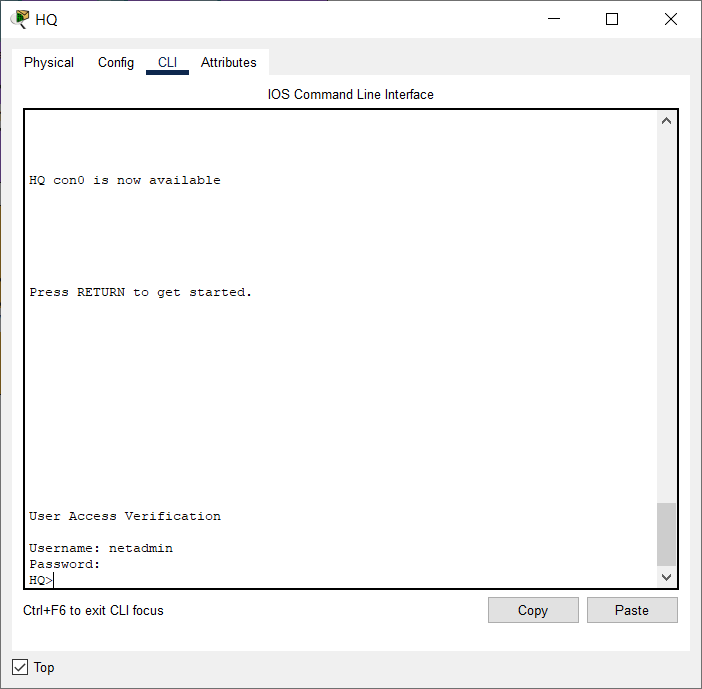
The network administrator has configured a Radius-based authentication system for Router HQ on the HQ Server.
However, Network administrators can only access Router HQ through console and SSH access using local user accounts.
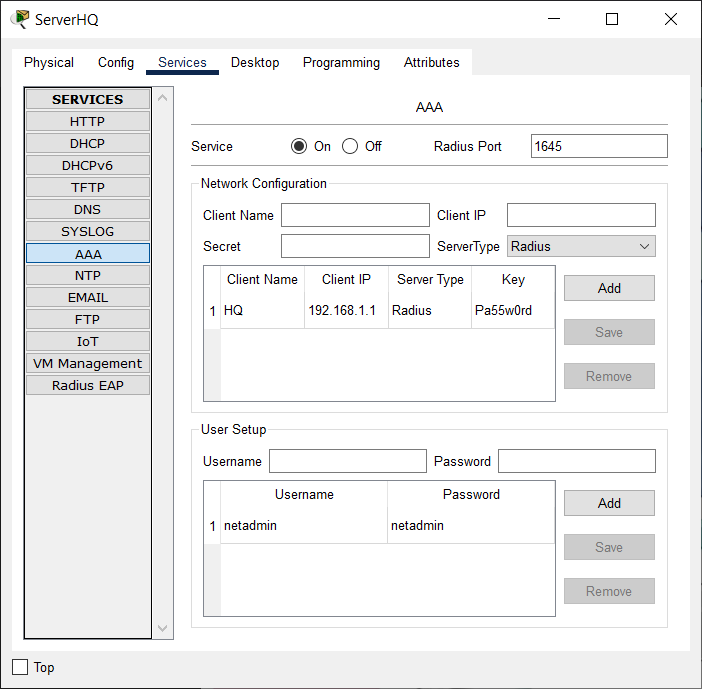
Answers: There was a typo in the HQ router side configuration, and the RADIUS service was not enabled in the ServerHQ section.
ROUTER HQ
Configuration :
/// First, we need to delete old configuration
HQ(config)#no radius-server host 192.168.1.253 auth-port 1645
HQ(config)#no radius-server key PaSSwOrd
HQ(config)#do sh run | section radius
aaa authentication login SERVER-AAA group radius local
/// Then, we add new configuration
HQ(config)#radius server 192.168.1.254
HQ(config-radius-server)#address ipv4 192.168.1.254 auth-port 1645
HQ(config-radius-server)#key Pa55w0rd
 WARNING: Command has been added to the configuration using a type 0 password. However, type 0 passwords will soon be deprecated. Migrate to a supported password type
*Sep 09 21:25:23.129: %AAAA-4-CLI_DEPRECATED: WARNING: Command has been added to the configuration using a type 0 password. However, type 0 passwords will soon be deprecated. Migrate to a supported password type
Before :
HQ#sh run | section radius
aaa authentication login SERVER-AAA group radius local
radius-server host 192.168.1.253 auth-port 1645
radius-server key PaSSwOrd
radius server 192.168.1.253
 address ipv4 192.168.1.253 auth-port 1645
After :
HQ(config)#do sh run | sectio radius
aaa authentication login SERVER-AAA group radius local
radius server 192.168.1.254
 address ipv4 192.168.1.254 auth-port 1645
 key Pa55w0rd
SERVERHQ Radius
Before :
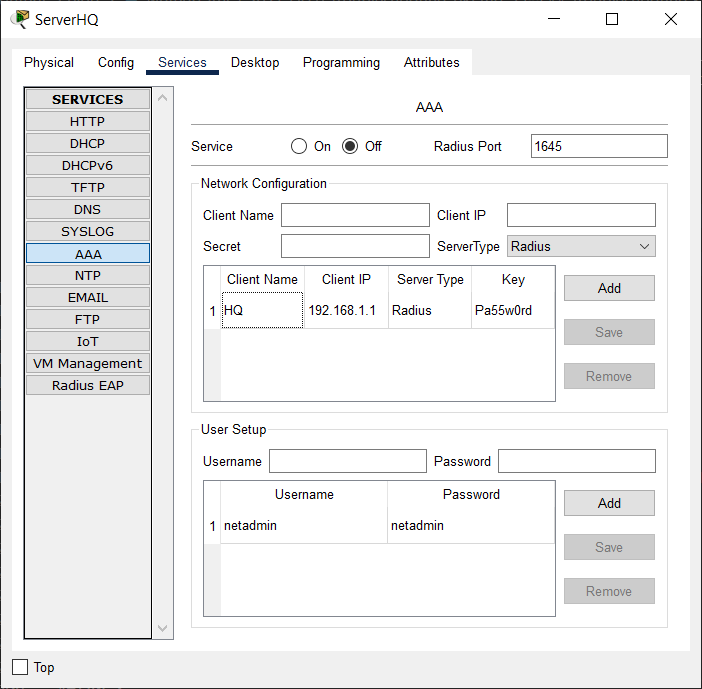
After :
Login Success :
Troubleshooting 4 (Point: 25)
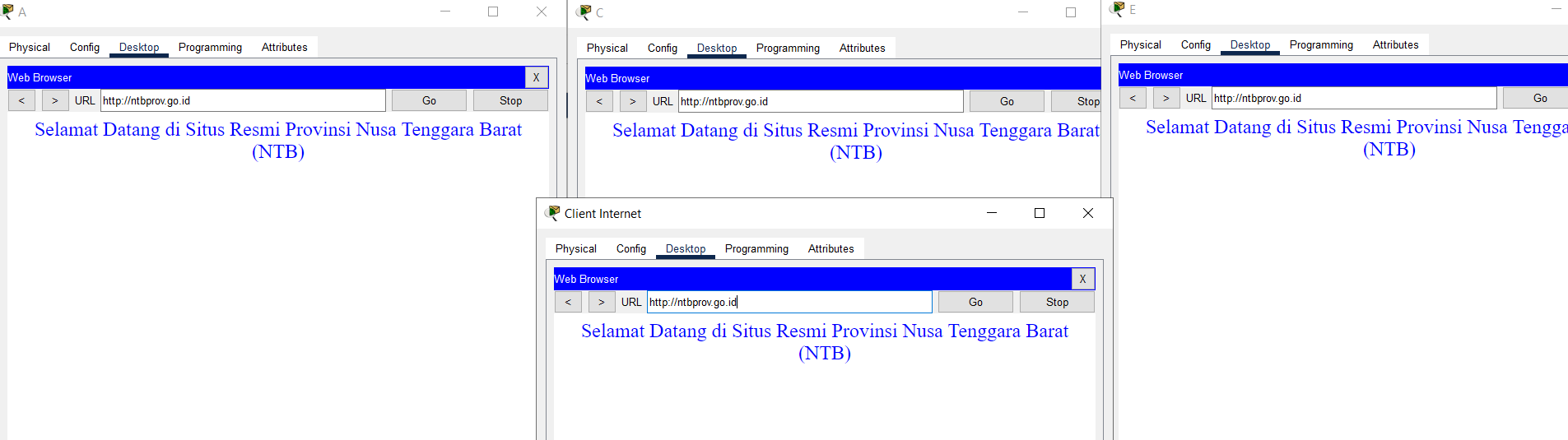
Questions: All hosts on LAN HQ, BRANCH1 and BRANCH2 of PT. AR, as well as Internet Client PCs on the Internet subnet, are unable to access the ntbprov.go.id site, but can access other sites.
Answers:
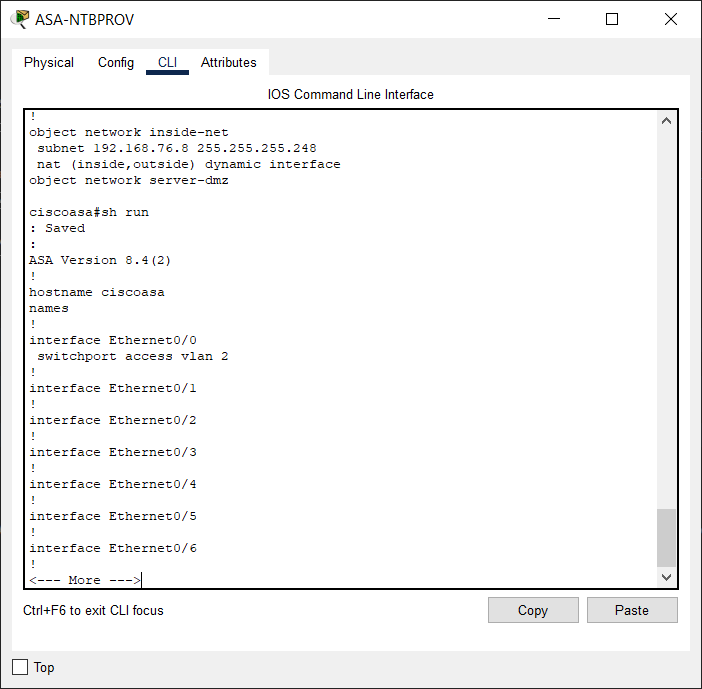
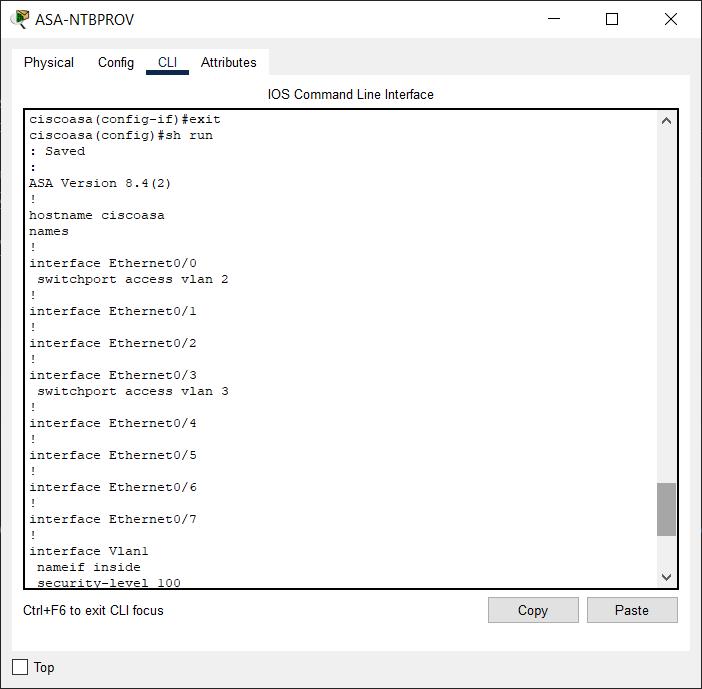
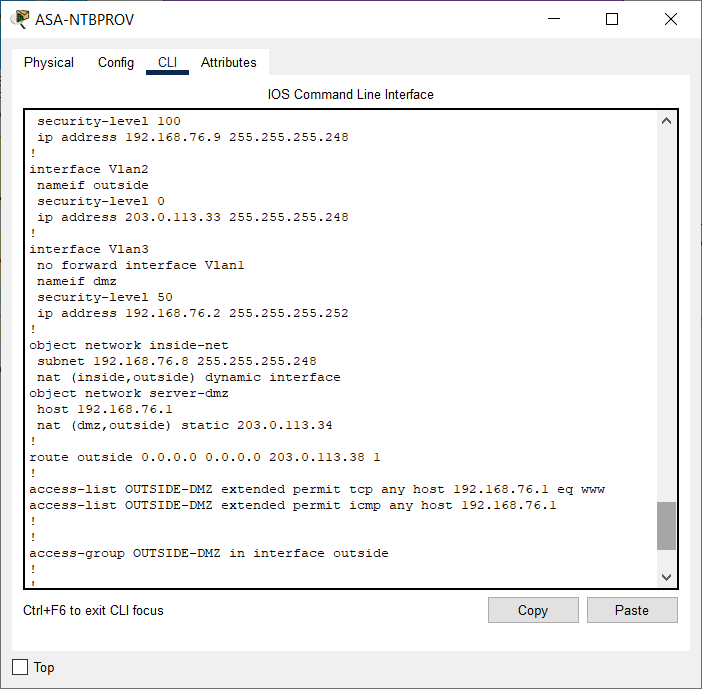
Assign port Ethernet0/1 to VLAN 3.
In object-network server-dmz, change the interface in out.
ASA-NTBPROV
Configuration :
ciscoasa>en
ciscoasa#conf t
ciscoasa(config)#int eth0/1
ciscoasa(config-if)#switchport access vlan 3
ciscoasa(config-if)#exit
ciscoasa(config)#object network server-dmz
ciscoasa(config-network-object)#nat (dmz,outside) static 203.0.113.34
Before :
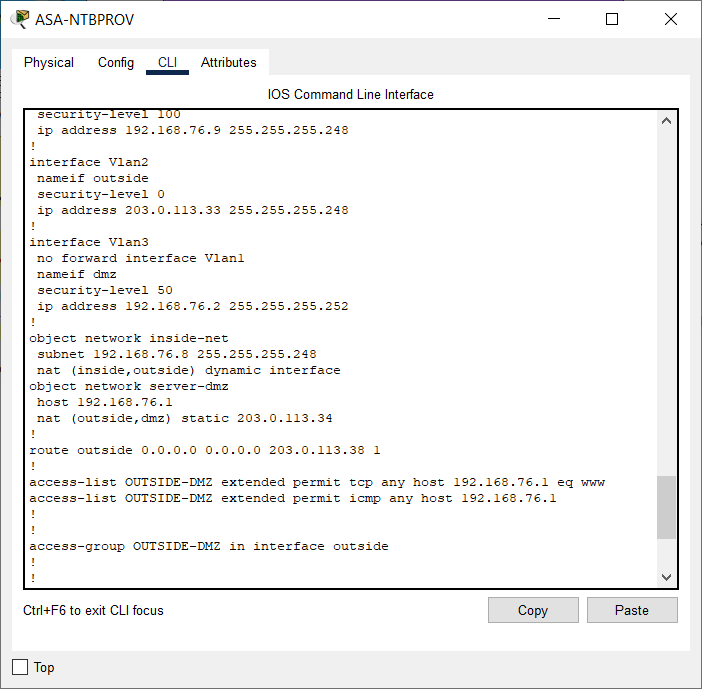
After :
Verification :
Summary
The questions aren’t too difficult, but I had trouble with a bug (?) in question 1.
In BRANCH1, the error “ISAKMP (0:1): Cannot start Aggressive mode, trying Main mode” appears on occasion.
At HQ, the error “%CRYPTO-4-RECVD PKT INV SPI: decaps: received IPSEC packet has invalid spi for” appears.
It occurs when I reload a.PKT file, so I must reload several times to avoid the bug.
I may update this post if I figure out how to fix these two bugs.