eNSP VS WSL 2
Table Of Contents
TLDR
Conflicts between Hypervisor.
Issues
To learn more about Huawei devices, I decided to use the Huawei Enterprise Network Simulator Platform eNSP to simulate an enterprise network.
So I followed the tutorial from an internet blog, but when I tried to run the program, I received the error message “Failed to start device AR1 error code 40.” in eNSP.
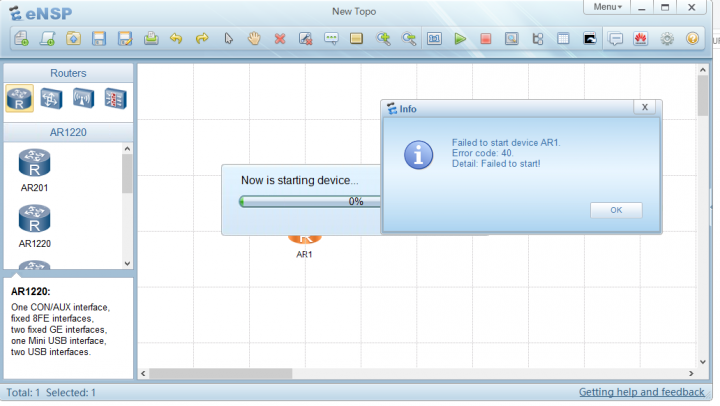
Then I looked for the error code message and discovered that WSL is incompatible with VirtualBox because WSL uses Virtual Platform and eNSP requires VirtualBox to run the simulation.
Why not use the most recent version of VirtualBox that supports Hyper-V?
Unfortunately, there has been no update from Huawei for eNSP until now.
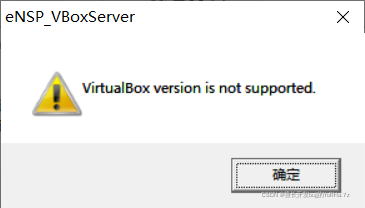
So, if we try to install the most recent VirtualBox and then run eNSP, we will get the message “VirtualBox version is not supported.”
Setup
OS Version : Windows 10 Pro 64bit Build 19044
Virtuabox Version : 5.2.44 r139111 (Qt5.6.2)
WSL Version : 2
Troubleshoot
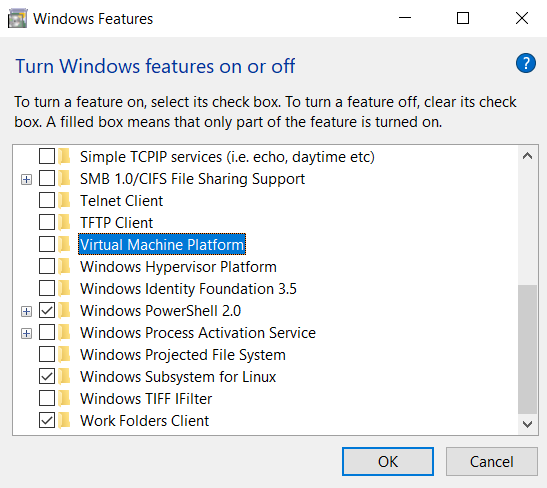
As a result, the short-term solution is to disable Virtual Machine Platform / Hyper-V using one of two methods : In my case, all I need to do is turn off Virtual Machine Platform.
- Using Powershell
To disable Hyper-V by using Windows PowerShell, follow these steps:
- Open an elevated PowerShell window.
- Run the following command:
Disable-WindowsOptionalFeature -Online -FeatureName Microsoft-Hyper-V-Hypervisor
- Reboot
- Using Windows Features To disable Virtual Machine Platform in Control Panel, follow these steps:
- In Control Panel, select Programs and Features.
- Select Turn Windows features on or off.
- Uncheck the Virtual Machine Platform.
- Reboot
Summary
Hopefully, Huawei will release eNSP updates to make it easier for WSL users, including students who want to learn Huawei devices and take the HCIA exam in the future.